We Ran 50 Apps in the Background — Here's Which Ones Were Quietly Eating Your Battery
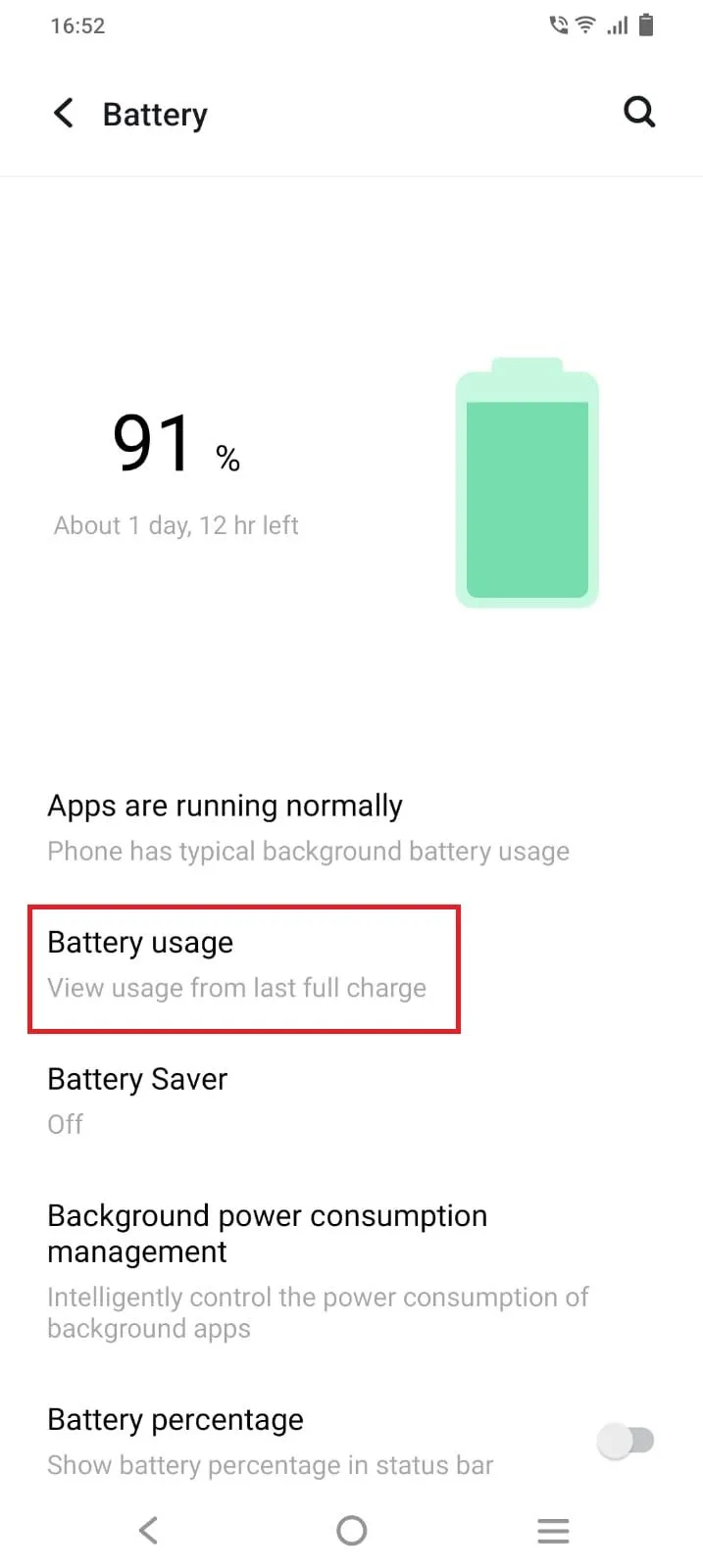
Photo: smartphone battery usage settings screen apps running background, via static1.anpoimages.com
Most people assume their battery life is just what it is. You charge at night, get through the day (maybe), and repeat. But there's a significant chunk of your daily battery loss that has nothing to do with how much you're actually using your phone — it's coming from apps running quietly in the background while your screen is off and your phone is sitting in your pocket.
We wanted to get specific about this. So we tested 50 of the most widely used apps in the US across both Android and iOS, tracking background energy consumption, wake frequency, location polling behavior, and network activity. What we found should change how you think about app management.
How We Tested (And Why It Matters)
Before getting into the rankings, a quick note on methodology. We used a combination of iOS battery usage reports, Android's battery stats via developer settings, and third-party monitoring tools to track background activity over consistent 24-hour periods with standardized device states. Apps were granted their default permissions on fresh installs — meaning whatever most users experience out of the box.
This matters because app behavior with default settings is what the average user actually deals with. Optimized settings can change outcomes dramatically, and we'll cover that — but the baseline numbers reflect what's happening on most phones right now.
The Social Media Tier: Worse Than You Think
Social media apps are the most discussed battery drain category, and the reputation is mostly deserved — but the breakdown within the category is more interesting than "social media bad."
Facebook and Instagram consistently ranked among the highest background consumers in our testing. Both apps use aggressive background refresh cycles, maintain persistent location polling even when you haven't explicitly used location features recently, and regularly wake the device to pre-load content. On Android, Facebook in particular has a well-documented history of running background processes that persist even after you close the app. Instagram showed similar patterns, unsurprisingly given they share infrastructure.
TikTok surprised us. It's a heavy foreground user — all that video — but its background behavior was more restrained than Facebook's in our testing. It still wakes the device regularly, but less aggressively than Meta's apps.
Snapchat was a consistent overperformer in the worst way. Its background location usage was among the highest of any app we tested, and it maintains background audio and notification processes that keep it partially alive even when closed. If you're a light Snapchat user who just keeps it installed, it may be costing you more than you're getting from it.
Twitter/X landed in the moderate range — notable background activity, but less aggressive than the top offenders.
Reddit was one of the cleaner performers in this category. Background refresh was present but relatively infrequent, and location usage was minimal by default.
Navigation Apps: The Obvious and the Not-So-Obvious
Active navigation is one of the heaviest battery use cases on any phone — GPS, screen-on, data, all running simultaneously. But background behavior when you're not actively navigating is a separate question.
Google Maps keeps location history running by default and performs periodic background location checks even when you're not navigating. If you've enabled location history or timeline features, it's polling your position more often than most users realize.
Waze showed similar background location behavior — perhaps expected given its crowdsourced traffic model, which benefits from knowing where you are even passively.
Apple Maps on iOS was notably lighter in background usage than Google Maps, partly due to iOS system-level restrictions on third-party location behavior. If you're on iPhone and want navigation with lower background overhead, Apple Maps is worth reconsidering.
Streaming Apps: It's About the Cache
Streaming apps drain battery hard in active use, but their background behavior is mostly about caching — pre-downloading content you might watch later.
YouTube was moderate in background activity. It does perform background refresh but is generally well-behaved when you're not watching.
Spotify and Apple Music both showed low-to-moderate background consumption. Music apps need to maintain audio pipelines, but modern versions have gotten reasonably efficient about this.
Netflix was surprisingly clean in background testing — it pre-downloads on Wi-Fi when you've set it to, but doesn't aggressively wake the device otherwise.
The Surprise Offenders Nobody Suspects
This is the section that generated the most discussion in our testing.
Weather apps — particularly third-party ones like Weather Channel and AccuWeather — were consistent background battery consumers. Both apps use location polling at high frequency to keep current conditions updated, and both showed background network activity that was disproportionate to their utility. The AccuWeather app in particular has faced scrutiny in the past for data collection practices beyond basic weather functionality. Apple's built-in Weather app and Google's weather widget performed significantly better.
News aggregator apps like Flipboard showed high background refresh rates. These apps are built around always having fresh content ready, which means they're waking your device and pulling data frequently.
Fitness and health tracking apps vary wildly. Apps that use continuous heart rate monitoring or GPS tracking — even passively — are among the highest sustained background consumers on the list. If you have a fitness app set to track activity automatically, it's essentially running a background GPS and sensor session all day.
Email apps deserve a mention. The default mail clients (Gmail, Apple Mail) are reasonably efficient. Third-party email apps that maintain persistent background connections to multiple accounts can be surprisingly costly, especially on Android where background restrictions are less uniform.
What You Can Actually Do About It
Knowing which apps are draining your battery is only useful if you do something about it. Here's a practical action plan:
On iPhone: Go to Settings → Battery → Battery Usage by App. Sort by background activity specifically, not just overall usage. For any app showing significant background consumption that you don't need running constantly, go to Settings → [App Name] and toggle off Background App Refresh. For location-heavy apps, set location access to "While Using" instead of "Always."
On Android: Settings → Battery → Battery Usage gives you a breakdown, but the more useful control is Settings → Apps → [App Name] → Battery, where you can set apps to "Restricted" background activity. For persistent offenders like Facebook, consider using it through your mobile browser instead of the native app — browser Facebook has dramatically lower background overhead.
For both platforms: Audit your location permissions quarterly. Apps accumulate "Always" location access over time as you grant it during setup and forget about it. Most apps that request "Always" location access don't actually need it to function.
Why Some Apps Are Built This Way
It's worth understanding the incentive structure here. Apps that keep you engaged — and keep tracking you — generate more advertising revenue. Background processes that monitor your location, refresh your feed, and pre-load content exist partly for your convenience and partly because user engagement data is valuable. Battery efficiency is rarely a primary design priority for apps operating on ad-based business models.
This isn't cynicism — it's just how the economics work. Apps optimized for battery efficiency tend to be paid apps or apps where the developer's interests align with yours (Apple's own apps, productivity tools you pay for, etc.).
The Bigger Picture
Background app drain isn't just an annoyance — over time, the extra charging cycles it forces contribute to battery degradation. Every unnecessary charge cycle is a small step toward the day your battery health percentage starts dropping visibly. Managing your app background behavior is one of the highest-leverage things you can do to extend the useful life of your phone's battery.
The 50-app test confirmed something we already suspected at UltraCellSaver: protecting your battery isn't just about what case you buy or how you charge. It's about understanding what's running inside your phone right now — and taking back control.